Tap
A guest taps the tag on the table with their phone. The menu opens in their browser — no app, no sign-up, no password.
A small tag sits on the table. Guests tap it with their phone — the menu opens, everyone orders together on one tab, and they pay right there. No app. No waiting for the bill. Debit first — the way Canada actually pays.
The demo is the real product, running in test mode. Tap around — you can't break it.
Try it right here
Sixty seconds, start to paid. Work the phone — it's the same flow as the real product, step for step.
Beatty Street Bistro
Table 12
This tag sits on the table.
Guests tap it with their phone.
No app. It just opens.
Beatty Street Bistro
Table 12
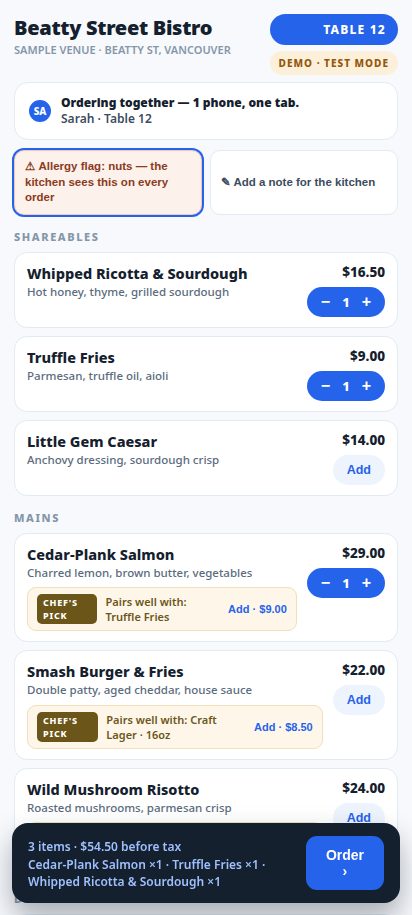
Ordering together — one tab for the table.
Beatty Street Bistro
Table 12
Two of you? Split it — each person pays only their share.
Beatty Street Bistro
Table 12
Shares always add up to the bill — to the cent.
Beatty Street Bistro
Table 12
Double-tap it if you like — a payment can never charge twice.
$0.00
Table 12 · Beatty Street Bistro
The kitchen has the order.
Nobody waited for a bill, a terminal, or a tip screen shoved at them.
Step 1 — your guest taps the tag on the table.
That phone is a simulation. The real product does this live, for real tables, right now.
Try the REAL live demo →How it works
A guest taps the tag on the table with their phone. The menu opens in their browser — no app, no sign-up, no password.
Everyone at the table orders onto one tab. It lands on the kitchen display and the staff board the second they send it.
When they're ready, they split the bill and pay from the phone. Your servers get their tables back faster.
A guest taps the tag on the nightstand. The room's page opens — dining menu, hotel services, everything in one place.
Dinner to the room. Extra towels. A wake-up call. A late checkout. Two taps — no phoning the front desk, no waiting on hold.
Requests land on the staff board instantly. If one sits for 10 minutes, the manager is alerted. Housekeeping stays in sync.
The part everyone hates, solved
No server doing math at the table. No "put $30 on this card and the rest on that one." Each person claims their items — shared plates split evenly — and pays only their share.
This is a real split from the live product's own test run. Watch the math — it lands exact, to the cent.
BEATTY STREET BISTRO
Table 7 · one tab, two guests
What you get
Everything here is running in the live product today — except the one card that says it's coming. We label the difference, everywhere.
The whole table joins one tab from their own phones. Add a note for the kitchen. Order when ready — not when a server happens by.
By item, by share, or straight down the middle. Every split sums to the cent — the register always balances.
A guest flags an allergy once. It rides on every order, big and red, where the kitchen can't miss it.
Orders appear as Fired · Ready · Served. The pass runs itself; your staff board shows every table, live.
Interac at your terminal today, cards and wallets through your own Stripe — and in-phone Interac on the way. KONEK — coming with Moneris enablement
A camera that watches the table, not the people — snapshots only, never video, no faces stored. Staff know when a table needs them before a hand goes up.
The full menu on the nightstand tag. Guests order to the room in a few taps — no hold music, no misheard room numbers.
Towels, wake-up calls, late checkout, a plumber for the tap — each request lands on the staff board the second it's made.
If a request sits for 10 minutes, it escalates to the manager on its own. VIP guests are flagged before they have to ask twice.
Occupied · Needs cleaning · Cleaning · Ready. The whole floor sees the same board — no radios, no knocking on wrong doors.
Guests find their booking, confirm their details, and pay at the kiosk — then collect their key at the front desk. The kiosk never issues keys. Simple, honest, fast.
Today's tabs, revenue by payment type, open requests, kitchen queue — pulled from the actual system. If it isn't real data, it isn't on the screen.
No mockups
Taken from the live system, running real test venues. Light screens, dark room — exactly what your team would use.


Paying — the whole point
That's the rule we built Tavora on. Here's every way a guest can pay, and exactly where each one stands — no fine print.
Stripe hosted Checkout runs on your own Stripe account. Guests pay by card, Apple Pay, or Google Pay. The money goes straight to you — Tavora never touches it.
Guests can still pay Interac at your terminal, exactly like today. Staff confirm it on the board and the tab closes. Nothing to relearn.
Interac right in the phone checkout, through Moneris KONEK — at a flat 12¢ per payment. Enablement is in Moneris's hands right now; the day it lands, it switches on.
Every phone payment by card costs 2.9% + 30¢. The same payment by Interac costs 12¢ flat. Drag the sliders to your real numbers.
An illustration, with the rates printed where you can see them. Card rate: Stripe Canada, 2.9% + $0.30 per payment. Interac rate: Moneris KONEK flat $0.12 — in-phone Interac launches when Moneris enablement completes; debit at your terminal works today.
Pricing
Founding pilot — restaurants
$1,000 setup + $300/mo per location
Start with one section of tables. QR tags are free — go live the same day.
Because the pitch is the product. You don't pay per order, you don't pay a percentage, and your guests' money never passes through us.
When you're ready to see it on your own tables, the pilot starts with a walkthrough — we look at your room, your menu, and your rush, and set it up with you.
Pilot — hotels
Pilot terms are set on a walkthrough.
Or try the kiosk yourself first — booking code 412-DEMO.
It's the fastest way to see what Tavora does for a property: a guest finds their booking, confirms, and pays — and collects their key at your desk, from a human, like always.
Try the kiosk demo →
Straight answers
No. They tap the tag, and the page opens in the browser already on their phone. Nothing to install, no account to create, no password to forget. If a phone can't tap, every tag also carries a QR code.
No — Tavora is POS-optional. Orders run on Tavora's own kitchen display and staff boards, alongside whatever POS you already have. No POS at all? Tavora still works. Nothing gets ripped out.
Canada runs on debit, so we built debit first. Today: guests pay Interac at your own terminal and staff confirm it on the board. Coming: Interac right inside the phone, through Moneris KONEK at 12¢ flat — enablement is with Moneris right now, and we badge it "coming" everywhere until the day it's live. Cards and wallets run through Stripe in the meantime.
Restaurants: the founding pilot is $1,000 setup + $300 a month per location — first 3 restaurants, price locked 12 months. Hotels: pilot terms are set on a walkthrough at your property. Either way it's a flat fee — no commission on your orders, no percentage of your sales.
AI Table Watch is a Phase 2 pilot — not part of the standard install, and it only ever runs on pilot tables with a signed privacy addendum. It takes a snapshot every 15–30 seconds. Never video. Never audio. No faces, no biometrics — it reads table states (seated, eating, finished), and frames are deleted seconds after they're read. There's a working kill switch, and a full privacy pack comes with the pilot.
This week. We set up your venue, menu, and BC taxes with you, and QR table tags can be printed the same day — those are free. NFC tap tags are ordered per venue when you sign. Most pilots start with one section of the room and grow from there.
See it live, then picture it on your tables. The pilot takes an afternoon to set up.